To amend a customer's details, click on the 'Amend Customer' sub menu link under the Customers menu. You will then be navigated to a screen where you will need to begin by selecting the customer you wish to amend:

Customer drop down selection
After selecting the customer you wish to amend from the drop down menu, the page will then redirect you to the customer's record so that you can then edit the details.
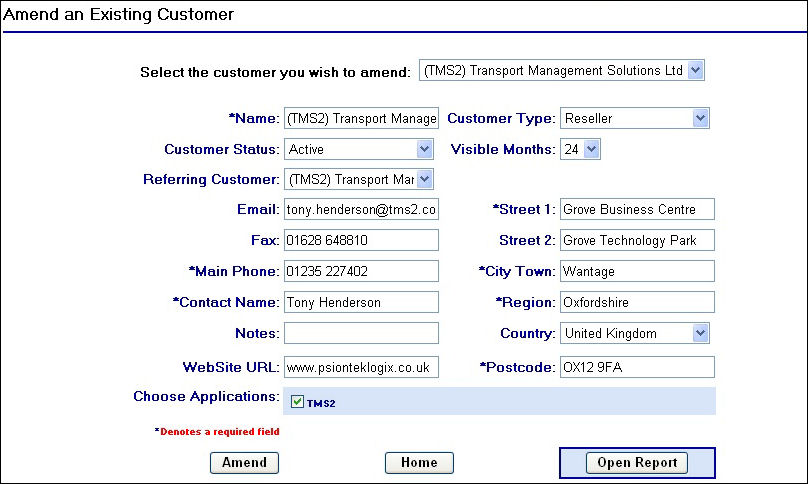
Customer record in amend view
To amend any of the details for the customer selected simply edit any of the fields in the record and click on the  button.
If you have selected the wrong customer record or wish to navigate to a different customer record, simply select the correct customer from the top drop down field. When clicking the correct customer the page will automatically update and reload the correct information into the fields.
You can click on the  at any time to go back to the home page. This will not save any changes you may have made in the customer record.
An additional feature of the customer amend page is the  button. When clicking this button in a customer record you will then be navigated to a new page which will display a summary of the customer details, users and units that belong to that customer.
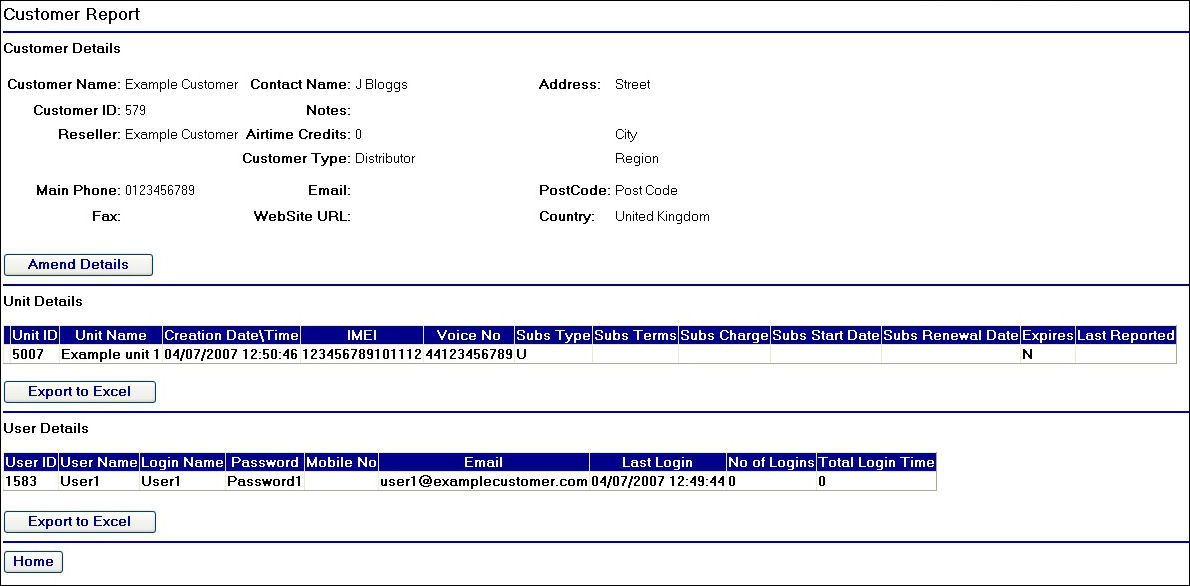
Customer Report Page
If you wish to amend the customer details you can click on the  button which will take you back to the previous screen where you can amend the customer's details. Should you wish to edit or navigate to any of the unit or user records shown in this report screen, you will need to hover over the row you are interested in and click once. This will then redirect you to the relevant page for that unit or user.
Note that you can also export the unit and user records for the customer into excel by clicking on the  button.
To return to the home page of the extranet click on the button.