To amend a customers airtime balance click on the 'Amend Credits' sub menu under the 'Airtime Credits' menu. You will then be navigated to the following page:

Customer Selection drop down
To begin select the name of the customer you wish to amend. This will then produce a number of additional fields:
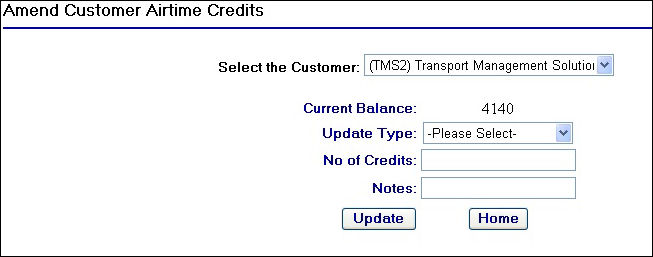
Amend Customer Airtime Credits
As you can see the current airtime balance is displayed along with fields allowing you to add or remove a number of airtime credits.
To perform an airtime credit update, you will first need to select the update type from the 'Update Type' field:
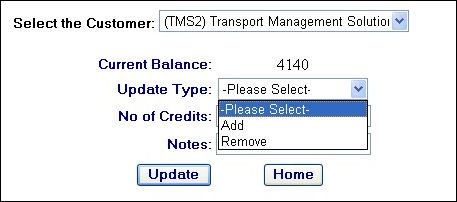
Update Type drop down
After selecting either the 'Add' or 'Remove' option you will then need to enter the Number of credits and any notes that need to be associated with the airtime credit update, for example a customer purchase order number or similar.
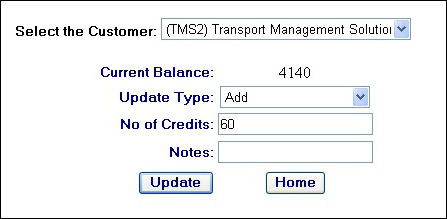
Adding airtime credits to a customer account
Once you have completed the fields and selected the update type click on the  button.
A new text field will then appear summarising the result of the update:
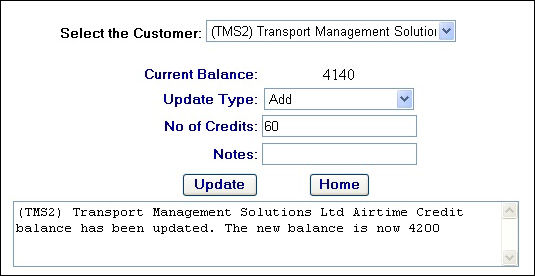
Succesful update of an airtime credit amend
Emergency Notification Watch SMS Alerts
When a vehicle watch is set up on the system, the user can specify the notification method for that watch, e.g. email or SMS alert. If a customer does not have enough airtime credits to cover the cost of an Emergency Notification Watch set up under a user's login then the system will still progress with sending out the alert as it is deemed a higher priority message. This will mean the customer is then left with a negative airtime credit balance on their account.
If the customer does not purchase additional airtime credits then the system will continue to send emergency watch SMS alerts which in turn will increase their negative balance. The maximum negative balance that the system will allow is -32,000 airtime credits