Throughout the life of a unit on the system there may be instances where the IMEI or SMS no changes, for example during a service call.
The Audit Trail page allows you to query a unit by its name or by it's IMEI to determine whether it has indeed had any previous detail changes on the system.
To begin using the Audit Trail page, click on the 'Audit Trail' sub menu link under the Mobile Devices menu.
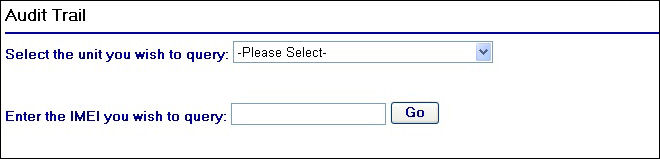
Audit Trail Page
As you can see from the screen shot above, there are a couple of fields in which you can either select or enter information.
Selecting a unit from the drop down field will cause the page to refresh and will only display results if there have been any associated IMEI or SMS no changes. If the page refreshes but no results are shown below the drop down field then it means there have been no changes in these details for this particular unit.
As an example, the IMEI for the unit with the name '686 MDX' has had its IMEI changed by one digit on the system. When selecting this unit from the drop down list the following results are displayed:

Selecting a unit from the drop down field
Two rows are returned which shows the previous IMEI and the current IMEI, along with a date and time of when the changes occurred. It is also worth covering the 'Event Reason Code' column as this explains why we have two rows returned. Notice that the reason codes are different - 'D' and 'I'. The reason code 'D' represents a deletion event against the unit record which in the example above represents the removal of the IMEI. The reason code 'I' is an insertion event which in this example records that a new IMEI is stored against the unit record.
The other method for performing an audit trail is by using an IMEI. To demonstrate the use of this method, the IMEI and SMS No for 686 MDX have been removed and used with a new unit created on the system called 686 MDZ (for example in the situation of a de-install and a re-install).
Entering in the IMEI that is now in 686 MDZ and clicking the  button returns the following rows:
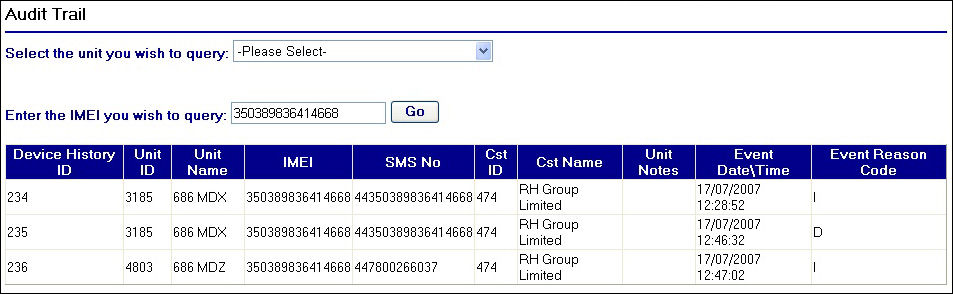
Searching by an IMEI
The rows that are returned begin by showing when the IMEI was originally stored against 686 MDX as an insertion ('I') event. A deletion event ('D') then follows which in this case represents when the IMEI and SMS no were removed from 686 MDX's unit record. Finally another insertion event occurs when the IMEI and SMS no are then stored against a new unit on the system call 686 MDZ.