The extranet supports the creation of drivers on the system as associated units. For example in the case of Antalis, a driver on the system is used to record when a driver performs a logon scan and a logoff scan.
To add a new driver to the database begin by clicking on the 'Add Driver' sub menu link under the Mobile Devices menu in the navigation menu.
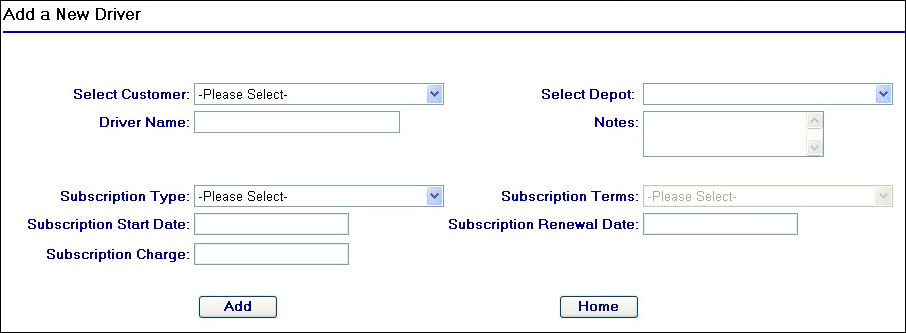
Add a new Driver Page
Continue by selecting the customer for which you wish to add the new driver too from the 'Select Customer' drop down field. You will notice when selecting the customer, any deopts that have been created against the customer will then be available in the 'Select Depot' drop down field.
For example, selecting 'Antalis' from the customer drop down field will display the available depots as shown in the screen shot below:
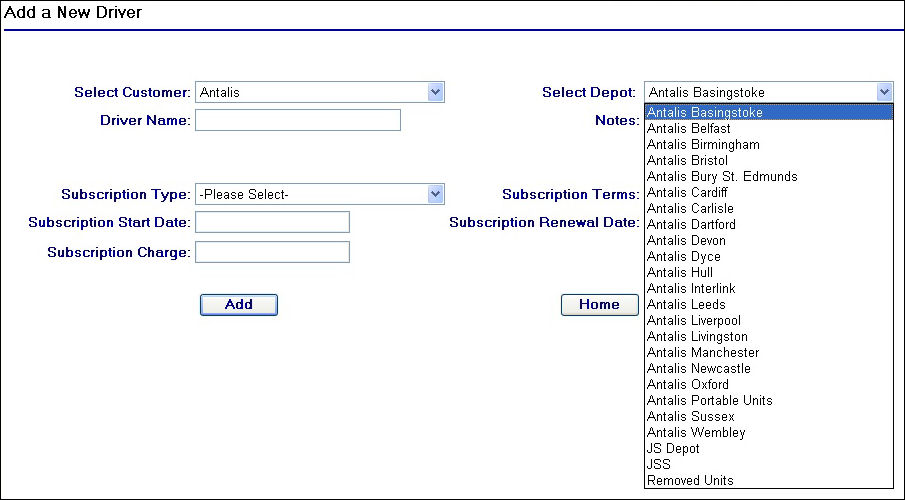
Customer and Depot Selection
Once you have selected the customer and the depot for which you wish to assign the new driver to, you will need to then enter a driver name. This name MUST match the name assigned to the driver's barcode that will be used for driver logons and logoffs.
If any subscription details need to be stored then these can also be completed, refer to the Mobile Device Fields page for help with these fields if required.
Once you have completed the fields, click on the  button to complete the action. If at any time you wish to exit the screen without saving any changes then click on the
  button to return to the homepage of the extranet.
You can change the depot that the driver belongs to any time after adding them to the system by using the Unit Depots page.